
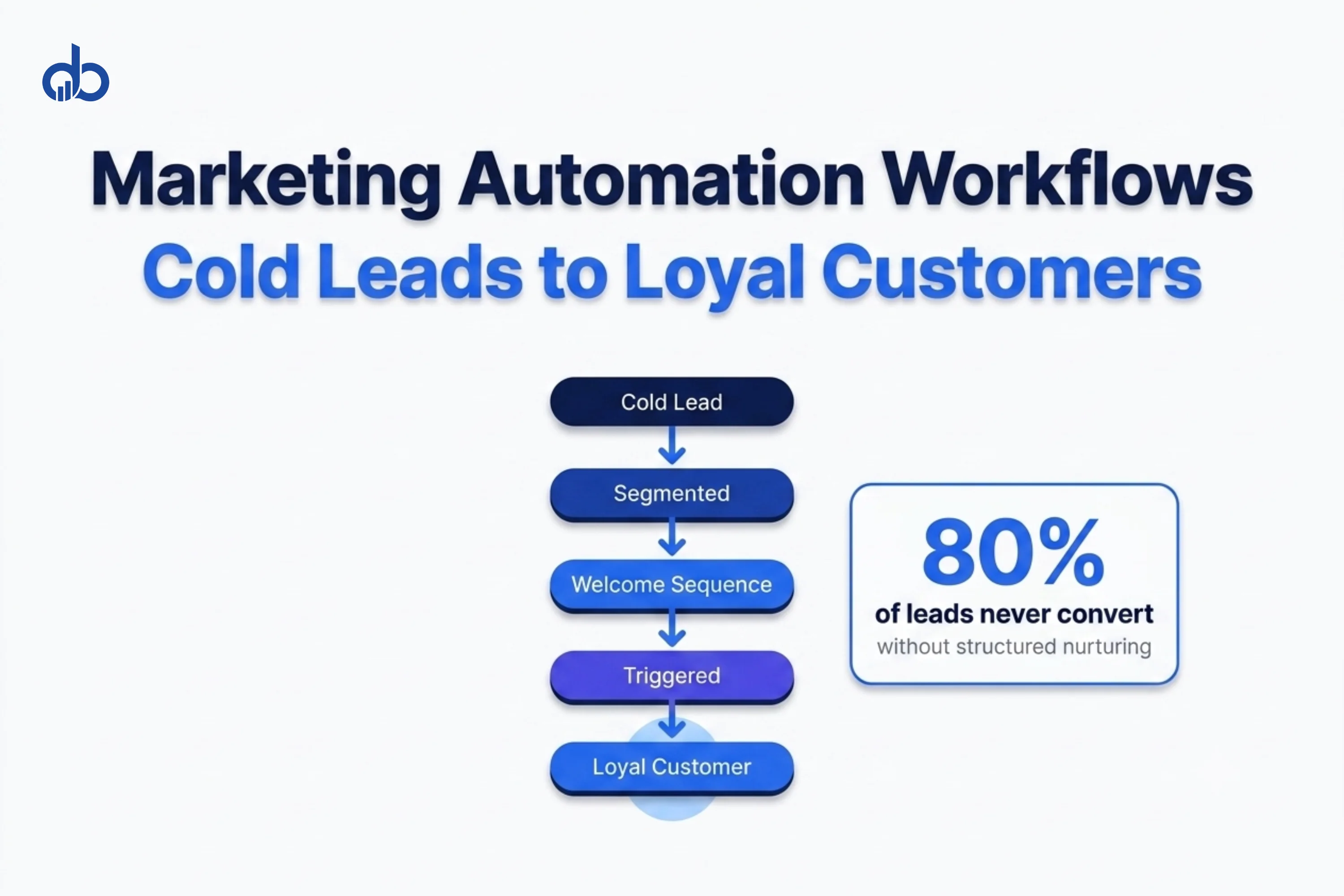
Most cold leads never buy. Not because your product is wrong or your pricing is off. Because nobody followed up with the right message at the right time.
80% of new leads never convert to sales without structured nurturing. That’s not a lead quality problem. It’s a systems problem. And the right marketing automation workflows fix it directly.
This guide walks through five workflows to convert cold leads into buyers. Each one includes specific trigger conditions, timing logic, and branching rules. These aren’t general concepts. They’re buildable sequences you can set up in any major CRM or email platform today.
One scope note: this guide covers trigger-based automation, meaning workflows that respond to individual lead behavior. It doesn’t cover broadcast campaigns or social media scheduling. Marketing automation in this context means sequences tied to what a specific lead does, not timers that fire for everyone at once.
What You Need Before You Start
Before building any workflow, get three things in order.
A CRM or email platform with trigger support. You need a tool that fires actions based on behavior, not just timers. ActiveCampaign, HubSpot, Klaviyo, and Drip all support conditional branching. Basic newsletter tools don’t.
Lead source tracking. Know where each cold lead came from. Organic search, paid ads, content downloads, event lists, and referrals all represent different awareness levels. Lead source is your first segmentation variable. Without it, you’re sending the same sequence to people at very different stages of familiarity with your brand.
A written definition of “sales-ready.” Before automating anything, define what a sales-ready lead looks like for your specific business. Someone who visited your pricing page twice? Someone who downloaded a case study and then visited your contact page? Write it down before you build anything. Without a clear endpoint, your workflows have no off-ramp.
If you’re unsure which platform fits your sales cycle or how to define your stages, Digiblazon’s Marketing Consulting team can map that out before you build a single sequence.
Step 1 — Segment Your Cold Leads Before Building Any Workflow
Segmentation is where most marketing automation fails. Companies dump all cold leads into one nurture sequence, then wonder why open rates collapse after the third email.
Here’s the core problem. A lead who downloaded a free checklist from a Google ad has almost no brand awareness. A lead who found you through organic search after reading four blog posts is already educated. Sending the same email sequence to both groups means you’re wrong for at least one of them.
That’s the part most teams skip. And it’s why their automation numbers look worse every quarter.
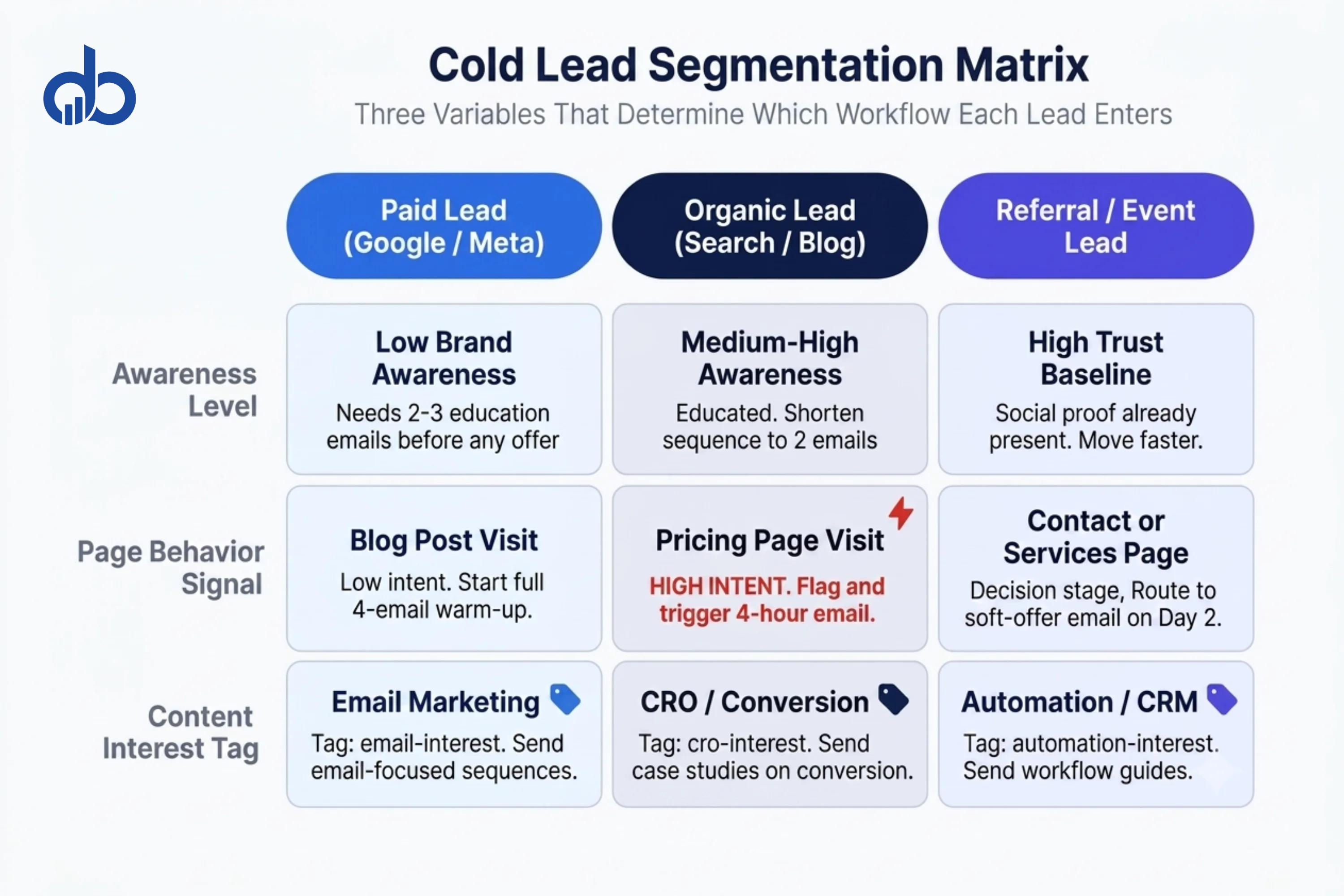
Segment cold leads by these three variables:
Lead source. Paid leads need more brand education before any offer makes sense. Organic leads arrive with higher intent and shorter buying timelines. Event lists and referral contacts have social proof built in from the relationship that brought them to your list. Each group starts at a different awareness level and needs a different sequence opening.
Page behavior before opt-in. A lead who visited your pricing page before signing up is warmer than someone who only read a blog post. Most CRMs can log this through a page-tracking script. Flag pricing-page visitors as high-intent at entry. They need fewer educational emails before you make a soft offer.
Content interest. If a lead downloaded a guide on email marketing, their specific problem is email. Send sequences focused on email, not your full product range. Relevance drives opens. Generic sequences drive unsubscribes.
Set this up using tags or custom fields in your CRM, applied at the point of capture. Your form or landing page should auto-tag each lead with source and content interest. This configuration takes under an hour. Every downstream workflow performs measurably better when cold leads are grouped from the start.
Are your cold leads receiving the same email as your warm ones? Get Free Marketing Audit
Step 2 — Build a Welcome and Warm-Up Email Sequence
The welcome sequence is the most underused marketing automation workflow in most businesses. Most companies send one welcome email, then switch directly to promotional content. That’s exactly where trust starts to break down.
Your welcome sequence has one job: move a cold lead from awareness to interest over 10 to 14 days. Not by selling. By demonstrating that you understand the reader’s situation well enough to earn the next email open.
The sequence runs like this:
Email 1 (Day 0, fires on opt-in): Confirm what the lead signed up for. Deliver the resource if applicable. Set expectations for what comes next. Keep it under 150 words. Don’t sell anything in Email 1.
Email 2 (Day 2): One practical tip that addresses a pain point directly connected to how this lead found you. No offer. The call-to-action is to reply with a question or to read a related post. This email exists to start a conversation, not to close a sale.
Email 3 (Day 6): A proof point. A short client result, a specific metric, or a case study excerpt. Three paragraphs maximum. One call-to-action: “See the full story.” Keep the numbers specific and real.
Email 4 (Day 10): Soft offer. A free audit, a demo, or a consultation. Acknowledge the lead’s situation first: “If you’re at the point where [specific pain point] is actively hurting your results, here’s how we can help.” One link, one action.
Trigger: Form submission or content download.
Branching rule: If a lead clicks any call-to-action in Emails 1 through 3, move them immediately into the behavioral trigger sequence in Step 3. Don’t wait for Day 10. They’ve already shown interest. Treat that signal.
Step 3 — Set Up Behavioral Triggers That Advance Leads Faster
Time-based sequences are a starting point. Behavioral triggers are where marketing automation workflows actually start to close the gap between cold and customer.
A behavioral trigger fires based on something the lead does, not just when a timer runs out. You respond to buying signals in real time instead of waiting for the next scheduled email.
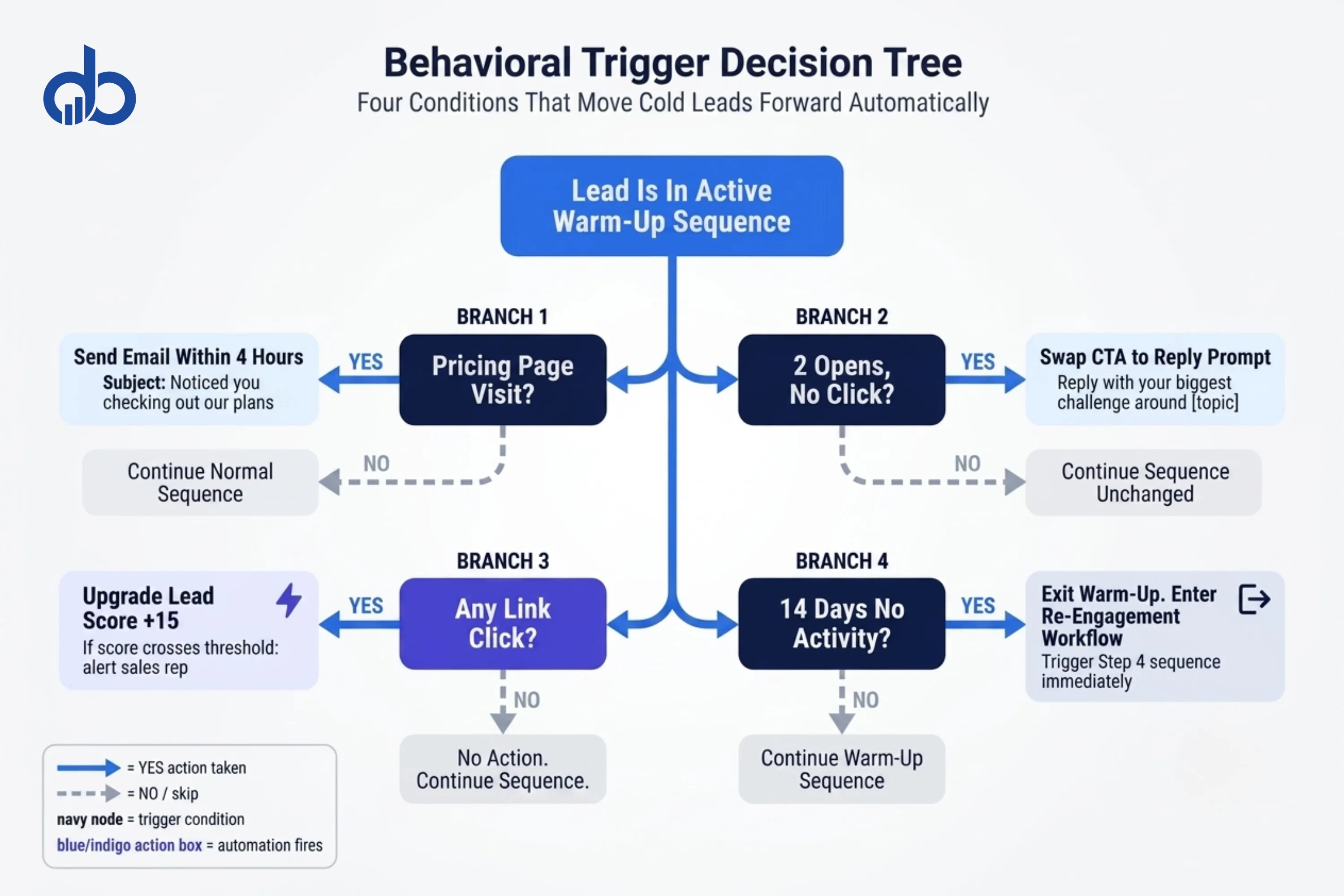
Four triggers to build:
Pricing page visit. A cold lead who visits your pricing page is showing buying intent. Fire an email within 4 hours. Keep the subject direct: “Noticed you checking out our plans.” The body should acknowledge the visit briefly, offer to answer questions, and include a link to book a call. No hard pitch. Just an open door.
Two opens with no click. The lead is reading but not acting. On the third email, swap the primary call-to-action for something lower-friction. Instead of “Book a demo,” try “Reply with your biggest challenge around [topic].” A reply moves them to a real conversation, which is worth more than an ignored button click.
Any link click in an email. Upgrade the lead score (Step 5). If the score crosses your warm threshold, either move the lead to a sales-focused sequence or alert the assigned sales rep directly.
No activity for 14 days. Exit the warm-up sequence automatically. Trigger the re-engagement workflow from Step 4.
Set these in your platform as if/then conditions. Every trigger should have both a “yes” path and a “no” path. Never leave a branch empty. An empty branch means leads fall off the map entirely and receive no further communication.
Step 4 — Build a Re-Engagement Workflow for Leads Who Go Silent
Not every cold lead responds to the initial sequence. Some go quiet after 30 days, some after 60. Most companies stop contacting them.
That’s a mistake.
Companies that excel at lead nurturing generate 50% more sales-ready leads at 33% lower cost than companies that don’t nurture past the first sequence. A re-engagement workflow lets you convert cold leads who already know your brand at almost zero additional acquisition cost.
Structure it this way:
Trigger: No email open or click for 30 consecutive days after the warm-up sequence ends.
Email 1 (Day 0 of re-engagement): Acknowledge the gap briefly. Don’t pretend you’ve been in active contact. “We haven’t been in touch for a while. Here’s something that just became relevant.” Share something genuinely new: a fresh piece of content, a tool update, or a recent data point. Not a pitch.
Email 2 (Day 5): Lead with a time-sensitive or seasonal pain point. “A lot of marketing managers are dealing with [specific problem] right now. Here’s what’s actually working.” Include one piece of fresh proof.
Email 3 (Day 10): Final touchpoint before exit. Keep it short. “We’re wrapping up this sequence. If [key pain point] is still something you’re working through, here’s where to start.” One link. No pressure.
If no response after Email 3: Move the contact to a suppression segment. Stop automated emails. Don’t delete them. If they re-engage through another channel, you can reactivate.
This workflow also protects your sender reputation. Repeatedly emailing contacts who never open degrades your deliverability. Exiting those contacts at 30 days keeps your list healthier and your inbox placement rate intact.
Step 5 — Add Lead Scoring to Connect All Your Workflows
Lead scoring is the connective tissue that ties your marketing automation workflows together. Without it, you have no reliable way to know which cold leads have warmed up enough for a direct sales conversation.
Here’s a scoring model to start with:
| Action | Points |
|---|---|
| Opens an email | +5 |
| Clicks a CTA in an email | +15 |
| Visits pricing page | +25 |
| Downloads a resource | +10 |
| Books a call or demo | +50 |
| No activity for 30 days | -20 |
Your CRM needs to log these actions automatically. If your analytics and tracking setup isn’t capturing page visits and email events yet, get that working before you build the scoring rules.
Set a warm-lead threshold. For most B2B companies with 30 to 90-day sales cycles, 50 to 60 points is a reasonable benchmark. When a lead crosses that threshold, two things happen automatically: they move from the cold nurture sequence to a shorter, sales-focused sequence, and a notification goes to the sales rep assigned to that account.
Start with five to seven scoring rules, not fifty. Run the model for 60 days. Then check which scored leads actually converted and adjust the weights based on what you see.
Nurtured leads make 47% larger purchases than non-nurtured leads. But only if nurturing continues up to the point of sale, not just through the first welcome sequence. Lead scoring keeps the process running past the point where most companies stop paying attention.
Common Mistakes That Break Marketing Automation Workflows
Even well-designed automation breaks in predictable ways. Here’s what to watch for.
Triggering too broadly. Setting a trigger as “any form fill” alerts your sales team when someone downloads a whitepaper for the first time. That’s a cold lead, not a hot one. Scope triggers precisely. “Form fill AND pricing page visit AND lead score above 40” is a meaningful sales alert. “Form fill” alone is noise.
No branching logic. A workflow without conditional branches sends the same content regardless of what the lead does. That’s a scheduled sequence, not automation. Real automation reads behavior and routes leads differently based on what they do. Build at least one conditional branch for each step.
Skipping list hygiene. Deliverability drops when you keep sending to contacts who never open. Anyone who hasn’t opened in 90 days should move to a suppression segment. Not deleted. Just not emailed until they engage again.
Using automation past the decision stage. Marketing automation handles education and qualification. It shouldn’t replace human contact when a lead is ready to make a decision. That’s a conversion optimization problem, not a tool problem. When a lead hits your sales-ready threshold, a real person follows up. Automation that keeps running past that point trains leads to expect no human contact, and it kills close rates at exactly the wrong moment.
Sending too frequently in the first 30 days. More than two emails per week in the first month damages both deliverability and trust. Space the initial warm-up sequence over 10 to 14 days minimum.
Conclusion
Marketing automation doesn’t convert cold leads. Automation with the right segmentation, behavioral triggers, and lead scoring does.
The five workflows here cover the full journey. Segment on intake so each lead enters the right sequence. Warm up over 10 to 14 days without selling too early. Respond to behavior in real time with triggers. Re-engage leads who go quiet before writing them off. Score everyone throughout so the handoff to sales happens at the right moment.
Automated emails generate 320% more revenue than non-automated campaigns. But that number assumes the automation is built correctly. If your current setup is one welcome email followed by a monthly newsletter, most of that potential stays untouched.
Digiblazon’s Performance Marketing team builds and audits marketing automation workflows for companies that are generating leads they struggle to convert. If you want to see exactly where your current setup is losing people, a free audit is the fastest way to find out.
Ready to see where your automation is dropping cold leads? Get Free Marketing Audit
Ready to Build Automation Workflows That Actually Convert? Get a free audit of your current lead nurturing setup and see exactly where cold leads are dropping off. Get Free Marketing Audit
- 80% of new leads never convert without structured nurturing — low conversion is a systems problem, not a lead quality problem
- Segment leads on source, page behavior, and content interest before they enter any sequence — one sequence for all lead types produces near-zero results
- A 10–14 day warm-up sequence sending no more than 2 emails per week protects deliverability and builds trust before any sales message is introduced
- Behavioral triggers (link clicks, key page visits, demo requests) outperform time-based drips because they respond to actual buying signals, not arbitrary intervals
- Lead scoring gates the handoff to sales — a qualified lead sent too early gets ignored; a scoring threshold ensures only sales-ready contacts reach the sales team
- Leads silent for 90+ days belong in a suppression segment, not an active drip — list hygiene directly protects deliverability across all active sequences
Frequently Asked Questions
What is marketing automation?
Marketing automation uses software to send emails, trigger follow-ups, and move leads through sequences based on predefined rules and behavioral signals — without manual intervention for each contact. It lets one person manage hundreds of lead conversations simultaneously by defining the conditions that trigger each message in advance.
How long does it take to see results from marketing automation workflows?
Most accounts see measurable improvement in lead engagement within 30 days of launching a properly segmented warm-up sequence. Conversion rate improvements on cold leads typically show in 60–90 days, once enough contacts have moved through the full sequence. Re-engagement workflows often produce results faster — within 2–3 weeks — because the list already exists.
How many emails should a cold lead nurture sequence have?
A cold lead warm-up sequence typically runs 5–7 emails over 10–14 days. The first 2–3 emails deliver value with no sales ask. Emails 4–5 introduce your service in the context of a problem you've already addressed. The final 1–2 emails include a direct CTA. Sequences shorter than 5 emails rarely build enough trust with cold contacts before asking for action.
When should marketing automation hand off to sales?
The handoff should trigger when a lead crosses a defined lead score threshold, not on a calendar date. A practical starting threshold: 50 points, where a demo request is worth 25, a pricing page visit is worth 15, and opening 3+ emails is worth 10. Below the threshold, the lead stays in nurture. Above it, automation stops and a sales rep follows up within 24 hours.
What is the best marketing automation platform for B2B?
For most B2B teams, ActiveCampaign works well for smaller lists and simpler pipelines. HubSpot fits teams that want CRM and automation in one platform. Marketo and Pardot are built for enterprise-scale accounts with complex scoring and multi-touch attribution requirements. The right platform depends on list size, sales cycle length, and whether your CRM is already locked in.