
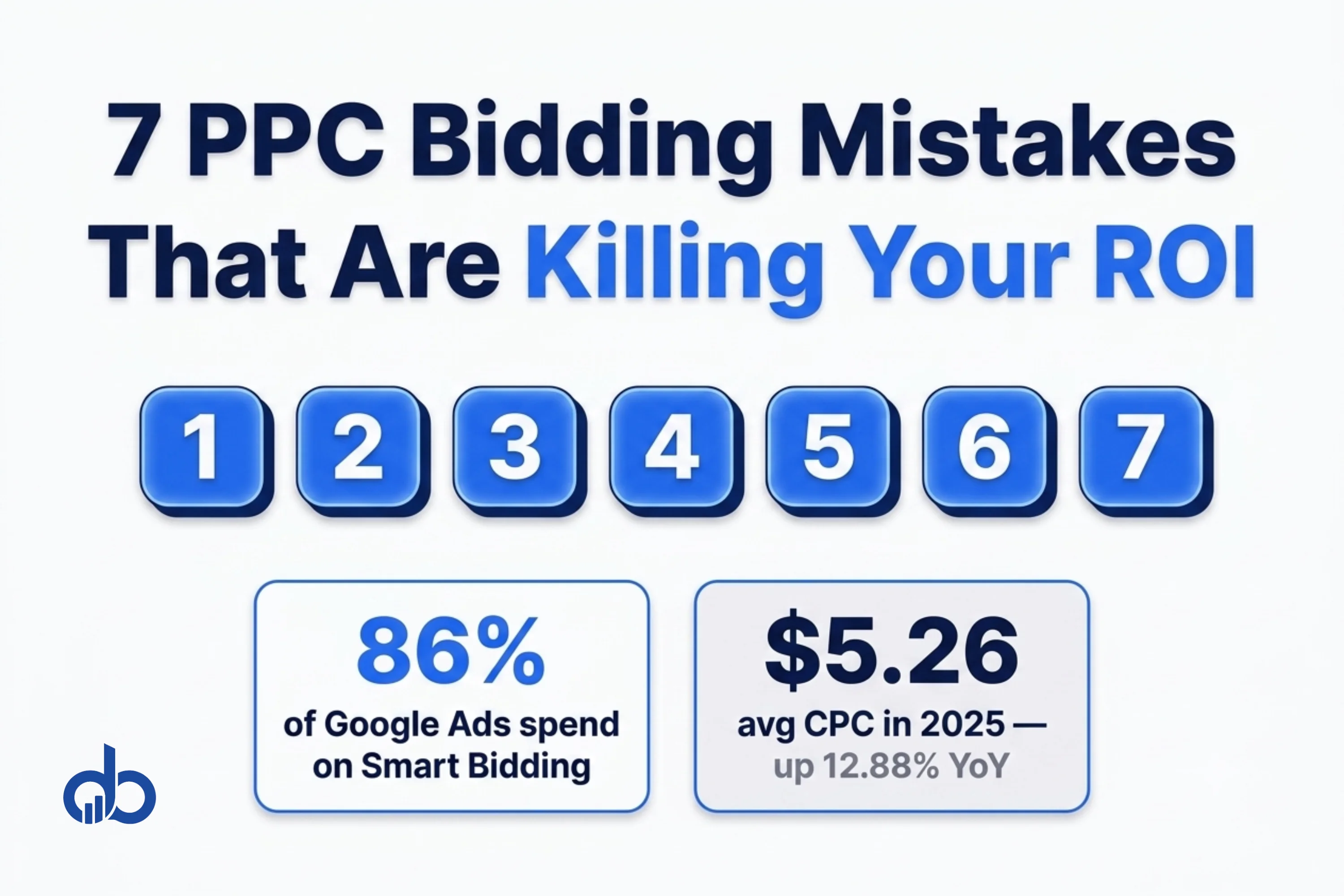
Eighty-six percent of Google Ads spend is now managed by Smart Bidding. At the same time, the average Google Ads CPC hit $5.26 in 2025, up 12.88% year-over-year. Knowing which PPC bidding mistakes to fix is no longer optional. Every calibration error costs more today than it did two years ago.
Here’s the problem: most advice about PPC bidding mistakes was written for a manual-bidding world. It covers choosing the wrong match types, ignoring negative keywords, and scheduling ads at the wrong time. That advice isn’t wrong. It’s just answering a question most advertisers stopped asking.
With Smart Bidding managing the vast majority of Google Ads spend, the mistake landscape has shifted. The new PPC bidding mistakes live inside the automation. They involve the signals you feed the algorithm, the targets you set, and the timing decisions you make around it. The algorithm doesn’t correct bad inputs. It amplifies them. Advertisers trying to improve PPC ROI by switching strategies are often solving the wrong problem entirely.
There are seven specific mistakes that break Smart Bidding performance repeatedly across accounts. None of them require switching strategies. All of them are fixable once you know what to look for.
Why PPC Bidding Mistakes Are More Expensive Than Ever
Context matters before the list. In 2022, a PPC bidding mistake on a $10,000/month account might cost $500 in wasted spend before the error became visible. With CPCs averaging $5.26 across Google Search in 2025, the same calibration error drains budget faster and takes longer to correct once Smart Bidding has built a flawed performance model around it.
Four numbers frame the stakes for every PPC bidding mistake covered below:
- 86% of Google Ads spend now managed by Smart Bidding (SearchLab 2026)
- $5.26 average Google Ads CPC in 2025, up 12.88% year-over-year
- 30 to 50 conversions needed in 30 days before Smart Bidding can optimize reliably
- 7 to 14 days the learning phase resets to each time you change a Smart Bidding target
The practical implication: an account making two or three of the mistakes below simultaneously may never exit the learning phase. It may also be spending its full budget without producing the conversions Smart Bidding needs to improve. That’s what makes these mistakes expensive. A single PPC bidding strategy audit often surfaces multiple issues active at the same time.
Mistake 1: Activating Smart Bidding Before You Have Enough Conversion Data
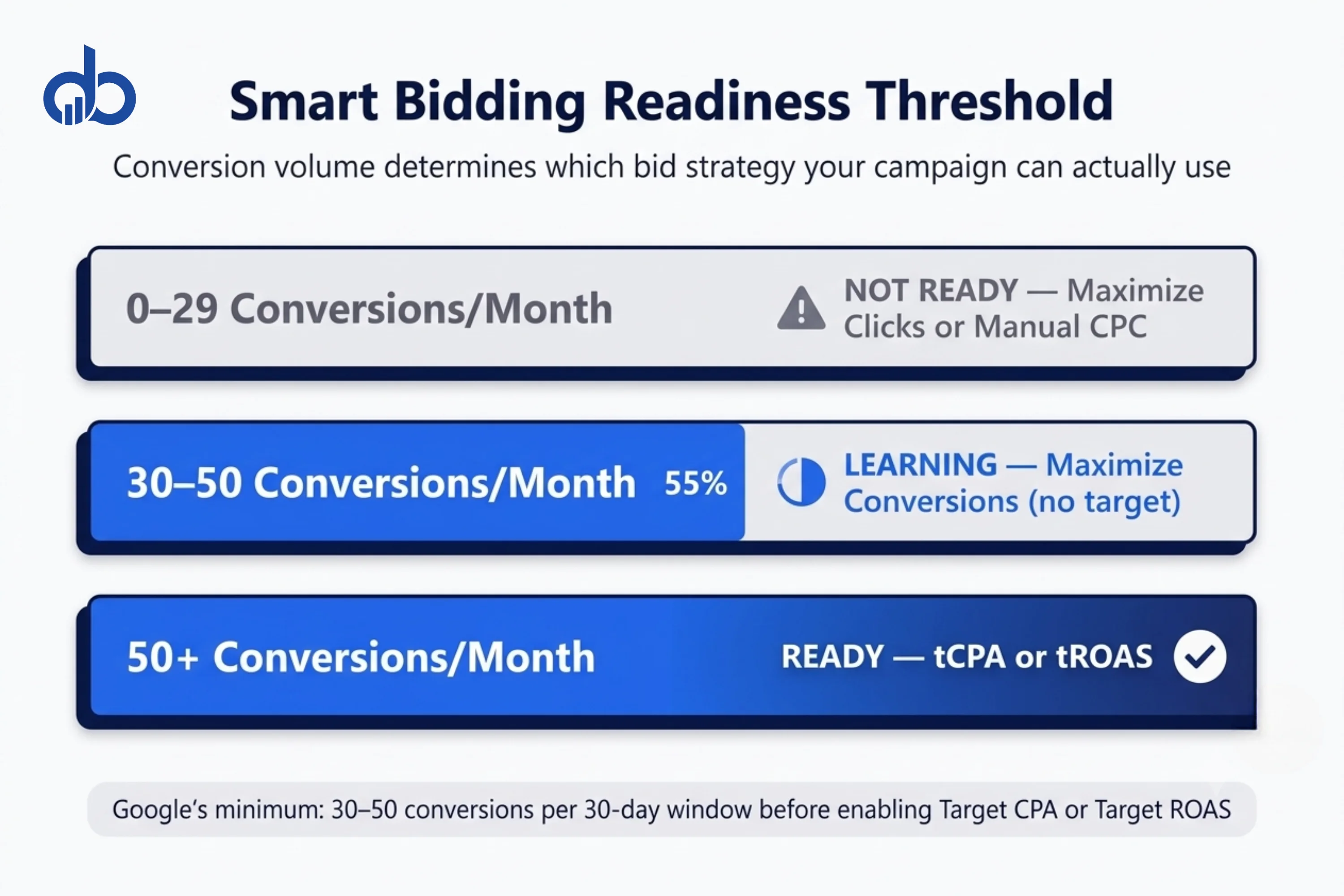
Google recommends at least 30 to 50 conversions in the past 30 days before switching to Target CPA or Target ROAS. Below that threshold, the algorithm has too little signal to identify which auction characteristics predict a conversion.
What happens when you activate Smart Bidding below the data floor? The algorithm experiments across a range of placements, devices, times of day, and audience segments. Without enough conversion data to identify patterns, it can’t distinguish between the auctions that convert and those that don’t. The result is volatile performance: periods of strong results followed by unexplained drops, or a steady drain of budget with no conversion signal returned.
The mistake isn’t activating Smart Bidding at all. It’s activating it before the account has earned the right to use it.
What to do instead: Before enabling Target CPA or Target ROAS, run Maximize Conversions without a target. This lets the algorithm collect data without the additional constraint of hitting a specific cost or return goal. Track conversions per 30-day rolling window. Once you hit 30 conversions consistently, you can move to tCPA. At 50 conversions, tROAS becomes viable.
A signal-starved algorithm isn’t a Smart Bidding problem. It’s a setup problem. Fixing it requires patience, not platform changes.
Running Smart Bidding on a new campaign with low conversion volume? Get Free Marketing Audit
Mistake 2: Setting tCPA and tROAS Targets Based on What You Want, Not What Your Data Shows
This is the most common PPC bidding mistake in established accounts, and the one most bidding guides miss entirely.
When you set a Target CPA, you’re telling Smart Bidding to find conversions at that specific cost. The algorithm adjusts bids in real time to hit the target. If you set a $40 tCPA target when your historical CPA is $78, Smart Bidding doesn’t try harder. It restricts bids so aggressively that the ads stop competing in auctions where the algorithm predicts a conversion above $40.
One documented account set its tCPA 40% below historical performance. The result: only 60% of the daily budget was spent, with no improvement in actual CPA. The algorithm interpreted an impossible target as an instruction to bid conservatively. That reduced both volume and learning at the same time.
The same dynamic applies to tROAS. Setting a 600% target when historical ROAS is 340% doesn’t stretch performance. It collapses impression share and conversion volume while the algorithm searches for auctions that almost never exist at that return level.
The calibration rule: Set your initial tCPA within 10 to 20% of your trailing 30 to 90-day average CPA. Set tROAS within 10 to 20% of your trailing ROAS. Adjust in 10 to 15% increments, waiting 2 to 3 weeks between each adjustment. This incremental approach lets the algorithm recalibrate without triggering a full learning phase reset.
The right target isn’t the target you want. It’s the target your data shows is achievable. The algorithm will find that target more efficiently than any manual approach. But it can’t find a target that doesn’t exist in the auction landscape.
Not getting the conversion volume your tCPA targets suggest? Get Free Marketing Audit
Mistake 3: Resetting the Smart Bidding Learning Phase With Every Change
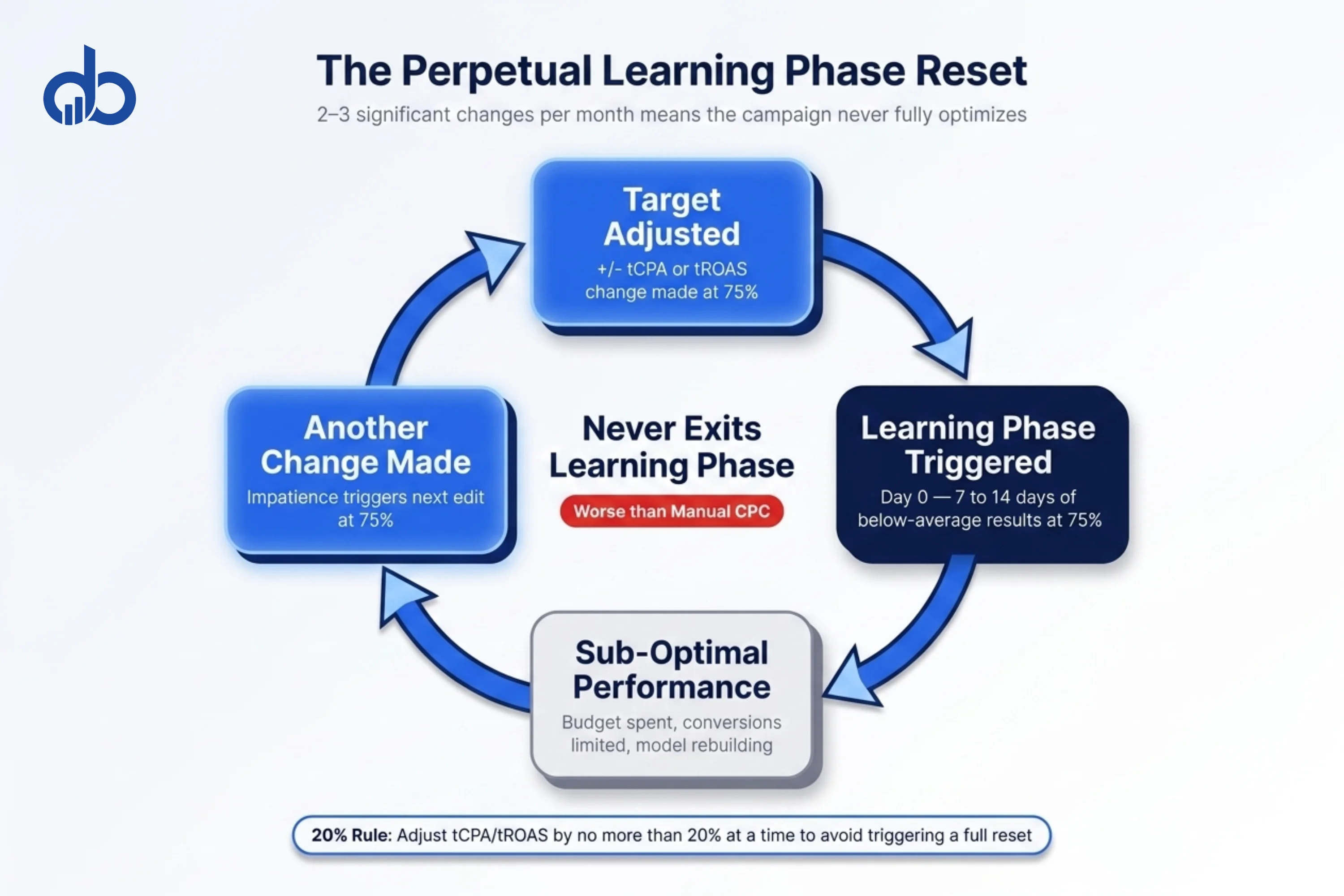
Every significant change to a Smart Bidding campaign resets the learning phase. That phase lasts 7 to 14 days of below-average performance while the algorithm rebuilds its model. An advertiser making two to three significant changes per month may never fully exit it.
What counts as a significant change? Target adjustments above 20%, daily budget changes, audience list modifications, switching between bid strategies, adding or removing ad groups, and changing your primary conversion action all trigger a reset. Minor edits (updating ad copy, adding a keyword, adjusting ad scheduling) typically don’t.
The compounding cost is real. A campaign in a perpetual learning phase produces worse results than a fully optimized Smart Bidding campaign. It also underperforms a well-structured manual CPC campaign. It’s the worst of both worlds: you’re paying Smart Bidding management overhead while the algorithm never builds the performance model that makes it worth using.
The 20% Rule
Limit tCPA or tROAS adjustments to no more than 20% at a time. Smaller changes are less likely to trigger a full learning phase reset. If you need to move a tCPA from $80 to $40, don’t make that change in one step. Move to $65 first, wait three weeks, then move to $52, then to $42. The total journey takes longer. But the campaign stays out of the learning phase throughout, and performance stays stable.
Consolidation as a strategy: If you have multiple campaigns with similar conversion goals, consolidating them can reduce the number of learning phase resets you manage. One campaign with 80 monthly conversions learns faster and more accurately than four campaigns with 20 conversions each. Fewer campaigns mean fewer resets, and fewer resets mean faster improvement.
Mistake 4: Feeding Smart Bidding Broken or Double-Counted Conversion Data
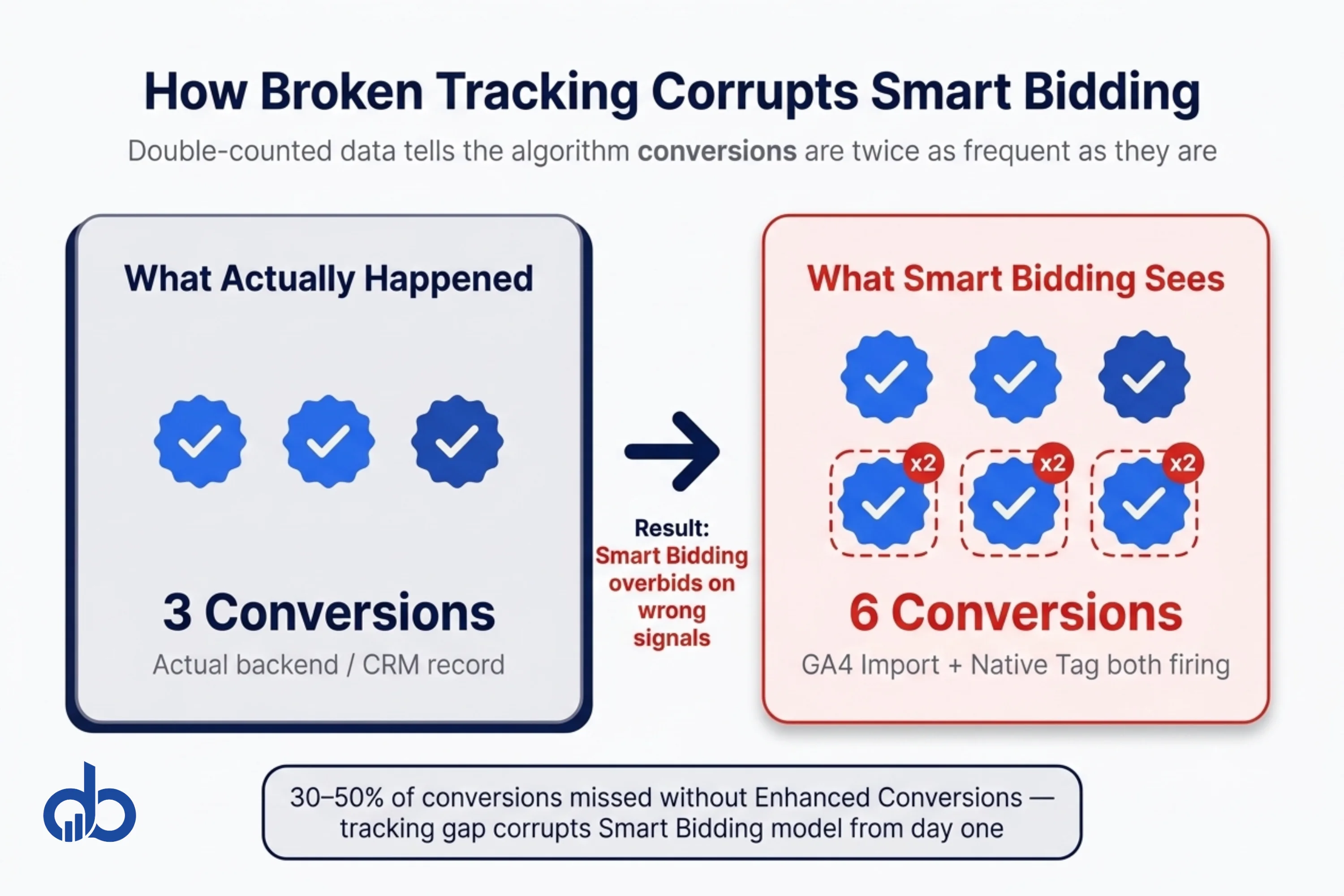
Standard cookie-based conversion tracking misses an estimated 30 to 50% of actual conversions due to privacy restrictions and iOS changes. Without Enhanced Conversions configured, Smart Bidding builds its model on partial data. The algorithm optimizes toward a signal that represents half the real picture.
The broken tracking mistake takes two forms. The first is the tracking gap: conversions that happen but are never recorded, leaving the algorithm with an incomplete signal. The second is double-counting: the same conversion recorded multiple times because GA4 import and the native Google tag are both firing on the same event. Smart Bidding interprets double-counted conversions as twice the signal strength and bids accordingly. Conversion volume metrics inflate while actual results stay flat.
How to diagnose the tracking gap:
- Compare Google Ads conversion volume against your CRM or backend order system for the same 30-day period
- If Google Ads shows significantly more conversions than your system, check for double-counting (GA4 import and native tag both active on the same event)
- If Google Ads shows significantly fewer, check Enhanced Conversions status and iOS consent settings
How to diagnose double-counting:
Open Google Ads, navigate to Tools and Settings, then Measurement, then Conversions. Check whether the same conversion action appears more than once: once from GA4 import, once from a directly-placed Google tag. If both are set to “Include in Conversions: On,” you’re double-counting.
PPC optimization that starts with clean conversion data produces compounding improvements. PPC optimization on corrupted data produces compounding misinformation. There’s no third outcome.
Not sure if your conversion tracking is feeding Smart Bidding clean data? Get Free Marketing Audit
Mistake 5: Using the Same Bid Strategy Across Every Campaign Stage
Maximize Conversions on a new campaign with $20/day budget and zero conversion history behaves completely differently from Maximize Conversions on a mature campaign producing 200 monthly conversions. Campaign maturity is the single most ignored variable in PPC bidding strategy selection.
The conventional advice to “switch to Smart Bidding” treats bid strategy choice as a one-time decision. In practice, the right strategy depends entirely on where the campaign is in its data-collection lifecycle. A PPC bidding strategy that works for a six-month-old account with 80 monthly conversions will actively harm a new account with 8.
Campaign Stage and Bid Strategy: A Decision Framework
| Campaign Stage | Recommended Strategy | Why |
|---|---|---|
| New: 0 to 30 conversions/month | Maximize Clicks or Manual CPC | Algorithm needs data before it can optimize for conversions |
| Growing: 30 to 50 conversions/month | Maximize Conversions (no target) | Let algorithm learn without target constraints |
| Established: 50+ conversions/month | Target CPA or Target ROAS | Sufficient data to optimize toward a specific goal |
| Scaling: 100+ conversions/month | Target ROAS or Maximize Conversion Value | Full automation with value-based bidding |
The transition between stages isn’t a calendar date. It’s a conversion volume threshold. If a campaign has been running for six months but only produces 12 conversions per month, it belongs in the “New” row of this table.
Most accounts that struggle with Smart Bidding performance are running an “Established” or “Scaling” strategy on campaigns that are still in the “New” or “Growing” stage. The strategy isn’t wrong for the account in general. It’s wrong for where that specific campaign sits in its lifecycle.
Matching the PPC bidding strategy to campaign data maturity is one of the most impactful adjustments in account management. It costs nothing to change and takes effect within the next auction cycle.
Mistake 6: Applying Manual Bid Adjustments That Conflict With Smart Bidding
In 2026, manual device, location, and time bid adjustments interact with Smart Bidding differently than they did with manual CPC. Smart Bidding already factors device, location, time of day, and audience membership into its real-time bid calculations at the individual auction level. When you stack a manual -30% mobile adjustment on top, you create a conflict: the algorithm has computed one mobile bid based on its prediction model, and the manual adjustment discounts that bid by 30%.
The result is unpredictable. In some accounts, stacked adjustments produce erratic device spend splits. In others, the algorithm compensates by bidding more aggressively on desktop to hit budget. Neither outcome reflects a coherent Google Ads bidding strategy. Both are the direct consequence of adding signals that contradict each other.
When to Use Bid Adjustments With Smart Bidding
The only manual adjustment that reliably adds value on top of Smart Bidding is a -100% device exclusion, which removes traffic from a device segment entirely. If your conversion data shows that mobile traffic never converts for your product or service, excluding it entirely gives the algorithm a clear signal. A partial -30% adjustment doesn’t. It creates ambiguity rather than direction.
For location and time adjustments, the same principle applies. A complete exclusion (targeting certain locations only, or restricting ad scheduling to specific hours) is a clear signal. A percentage-based partial adjustment on top of Smart Bidding produces noise.
A clean Google Ads bidding setup removes conflicting signals rather than adding them. Every manual adjustment you apply is a constraint the algorithm has to work around. The more constraints you add to a Smart Bidding campaign, the less room the algorithm has to find the auctions where conversions actually happen.
Want to audit your full Google Ads bidding setup for conflicting signals? Request a Proposal
Mistake 7: Obsessing Over Quality Score While Ignoring Bid Strategy Signal Quality
Quality Score (QS) affects your cost-per-click floor. A low QS means you pay more for each click than a competitor with equivalent bids and a higher score. That’s a real cost. But improving QS only makes your campaigns slightly cheaper. It doesn’t fix a miscalibrated tCPA target, a broken conversion tracking setup, or a learning phase that resets every week.
The signal quality problem is upstream of the click price problem.
Most PPC optimization time gets allocated to QS work: improving ad relevance, refining landing pages, tightening keyword-to-ad match. These tasks produce small, incremental gains on the click cost. They produce no gains on conversion rate, conversion tracking accuracy, or bid strategy calibration: the things that actually determine whether an account can improve PPC ROI.
A campaign with QS of 8 and a tCPA target set 40% below historical performance will underperform a campaign with QS of 6 and a correctly calibrated tCPA target. Bid strategy signal quality is the higher-priority problem. Time spent auditing Google Ads bidding signal quality returns more than time spent chasing QS improvements.
Signal Quality Self-Audit: 7 Checks
- Confirm Enhanced Conversions is enabled and firing correctly
- Verify no conversion actions are double-counted across GA4 import and the native Google tag
- Check that your primary conversion action is set to the right action, not page views or soft events
- Confirm the “Include in Conversions” toggle is on for your primary conversion action only
- Review historical CPA/ROAS in account data before setting tCPA/tROAS targets
- Check whether any campaigns are “limited by budget,” which caps Smart Bidding learning
- Count conversions in the past 30 days before enabling Target CPA or Target ROAS
If more than three of these checks expose an issue, the PPC bidding strategy problem is a data quality problem. Fix the data quality first. The bidding strategy decisions follow.
Running Smart Bidding but not sure if your signals are clean? Request a Proposal
Fix the Inputs, Not the Strategy
You can now identify the seven specific ways Smart Bidding breaks in live accounts. It’s not because the strategy is wrong. It’s because of what gets fed into it. The accounts that successfully improve PPC ROI through automation aren’t using different strategies. They’re using better inputs. The gap between knowing these mistakes and having the account structure to avoid them requires a full audit of conversion tracking, target calibration, learning phase history, and campaign maturity alignment.
That’s what Digiblazon’s Performance Marketing service is built around. Most accounts have at least three of these seven mistakes active simultaneously. Start with a Free Marketing Audit to see where your account stands.
Are your PPC bids optimizing, or just spending? Get Free Marketing Audit
Key Takeaways
- Smart Bidding needs at least 30–50 conversions per 30 days before enabling Target CPA or Target ROAS.
- Set tCPA/tROAS targets within 10–20% of historical performance — not aspirational goals.
- Two to three campaign changes per month can trap campaigns in a permanent learning phase.
- Double-counted or missing conversion data corrupts Smart Bidding’s optimization signal.
- Match your bid strategy to campaign data maturity, not account age.
- Manual bid adjustments conflict with Smart Bidding — use -100% exclusions instead of partial adjustments.
- Signal quality (conversion tracking, target calibration) outweighs Quality Score for ROI improvement.
Frequently Asked Questions
How many conversions do I need before using Smart Bidding?
Google recommends a minimum of 30 to 50 conversions in the past 30 days before enabling Target CPA or Target ROAS. Below that threshold, the algorithm lacks enough signal to identify which auction characteristics predict conversion. Use Maximize Conversions without a target first. Let the algorithm accumulate data before you add constraints.
How long does the Google Ads Smart Bidding learning phase last?
The learning phase typically lasts 7 to 14 days, or until the campaign accumulates 50 conversions under the new target, whichever comes later. Significant changes reset the learning phase. Two to three changes per month means you may never fully exit it.
How do I set a realistic tCPA or tROAS target?
Start by pulling your actual CPA or ROAS from the past 30 to 90 days in the Google Ads interface. Set your initial tCPA target within 10 to 20% of that historical average. If you set it more than 20% below historical performance, the algorithm restricts bids aggressively and volume collapses. Adjust targets in small increments every 2 to 3 weeks.
What resets the Smart Bidding learning phase?
Significant campaign changes trigger a reset: adjusting your tCPA or tROAS target, changing your daily budget by more than 20%, adding or removing ad groups, switching bid strategies, and changing your primary conversion action all reset the learning period. Minor edits (adding a new ad, updating ad copy, adding keywords) typically don't trigger a reset.
Should I use manual bid adjustments with Smart Bidding?
Generally, no. Smart Bidding already processes device, time-of-day, location, and audience signals in real time at the individual auction level. Stacking manual adjustments creates conflicting signals. The one exception is a -100% device exclusion to remove traffic from a device entirely.
Why is my Smart Bidding campaign spending all its budget with no conversions?
This typically indicates one of three issues: the algorithm is in the early learning phase and testing placements, your conversion tracking is broken so the algorithm has no feedback signal, or your tCPA target is set so low that the algorithm is bidding on low-CPC placements that rarely convert. Check conversion tracking first, then review your historical CPA against your current target.