
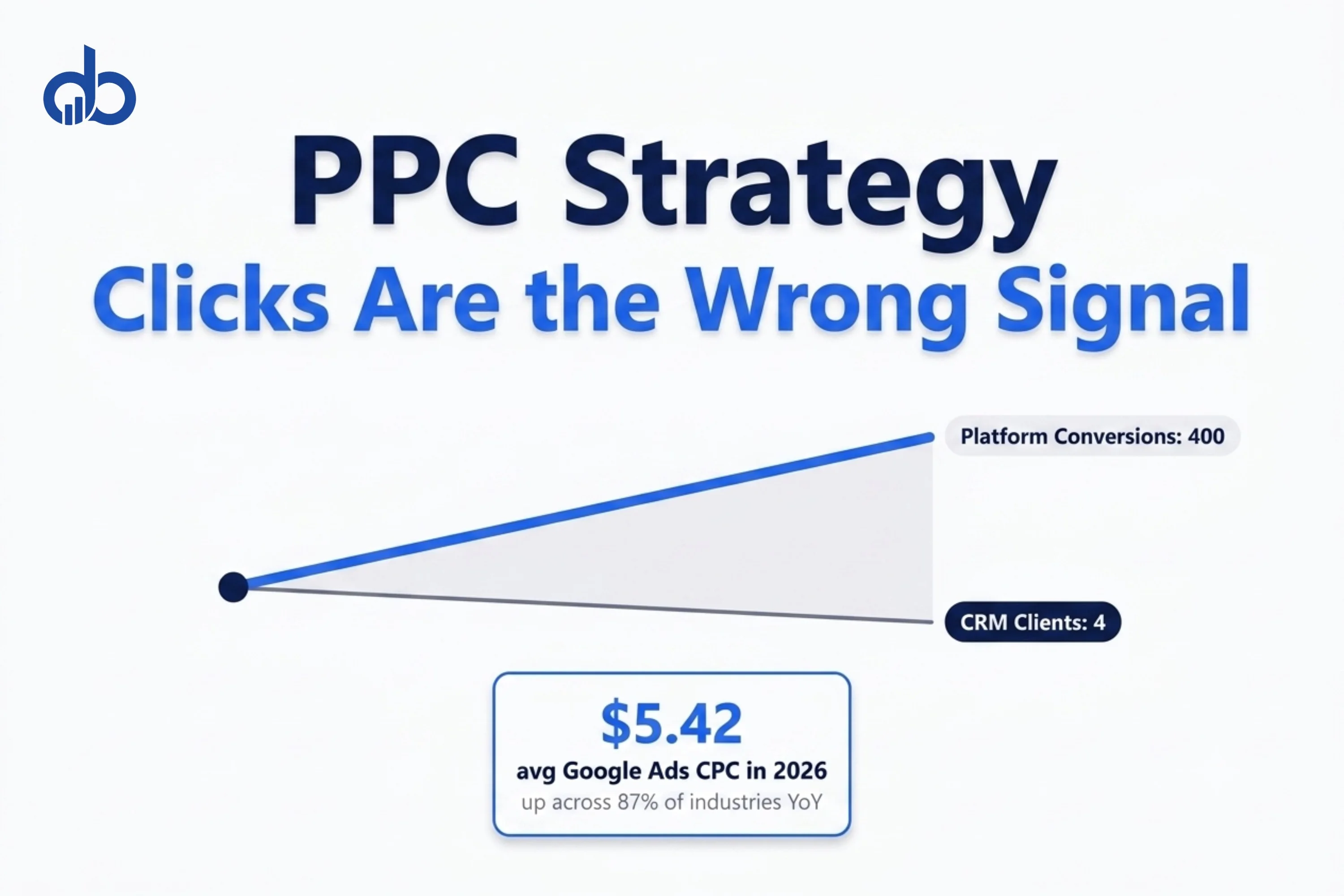
Google Ads campaigns across most industries now run on Smart Bidding. The average cost-per-click hit $5.42 in 2026, rising across 87% of industries year-over-year. Budget gets reviewed quarterly. Every metric in the platform dashboard says the campaign’s performing.
Revenue disagrees.
This pattern shows up in PPC accounts of every size. The platform reports improving cost-per-lead. The sales team reports leads that go nowhere. That gap between what the ad platform records and what the CRM confirms isn’t a tracking problem or a budget problem. It’s a signal problem. The campaign is feeding Smart Bidding exactly what it needs to find form-fillers, not buyers. There are three specific places this disconnect shows up, and none of them are visible inside the platform. Fixing them doesn’t require higher spend or new creative. It requires changing what your bidding algorithm treats as a win.
The Conventional Wisdom: Measure Clicks, Then Shift to Conversions
Every PPC training course, agency guide, and platform tutorial agrees on the starting position for a PPC strategy for sales: clicks are a vanity metric. Stop optimizing for cost-per-click. Move to cost-per-acquisition. Track conversions, not impressions.
The logic is sound. A campaign generating 10,000 clicks at $0.50 each and producing one customer isn’t the same as a campaign generating 2,000 clicks at $2.50 each and producing fifty. CPA is a better lens than CPC. Most experienced PPC practitioners have absorbed this lesson. Maximize Clicks has given way to Smart Bidding. Dashboards now report conversion rates, cost-per-lead, and impression share alongside click volume.
That shift represents real progress. But it still leaves most campaigns one step short of the right optimization signal. And in 2026, that one step is costing advertisers money they can’t see losing.
Where the Conventional Wisdom Breaks Down
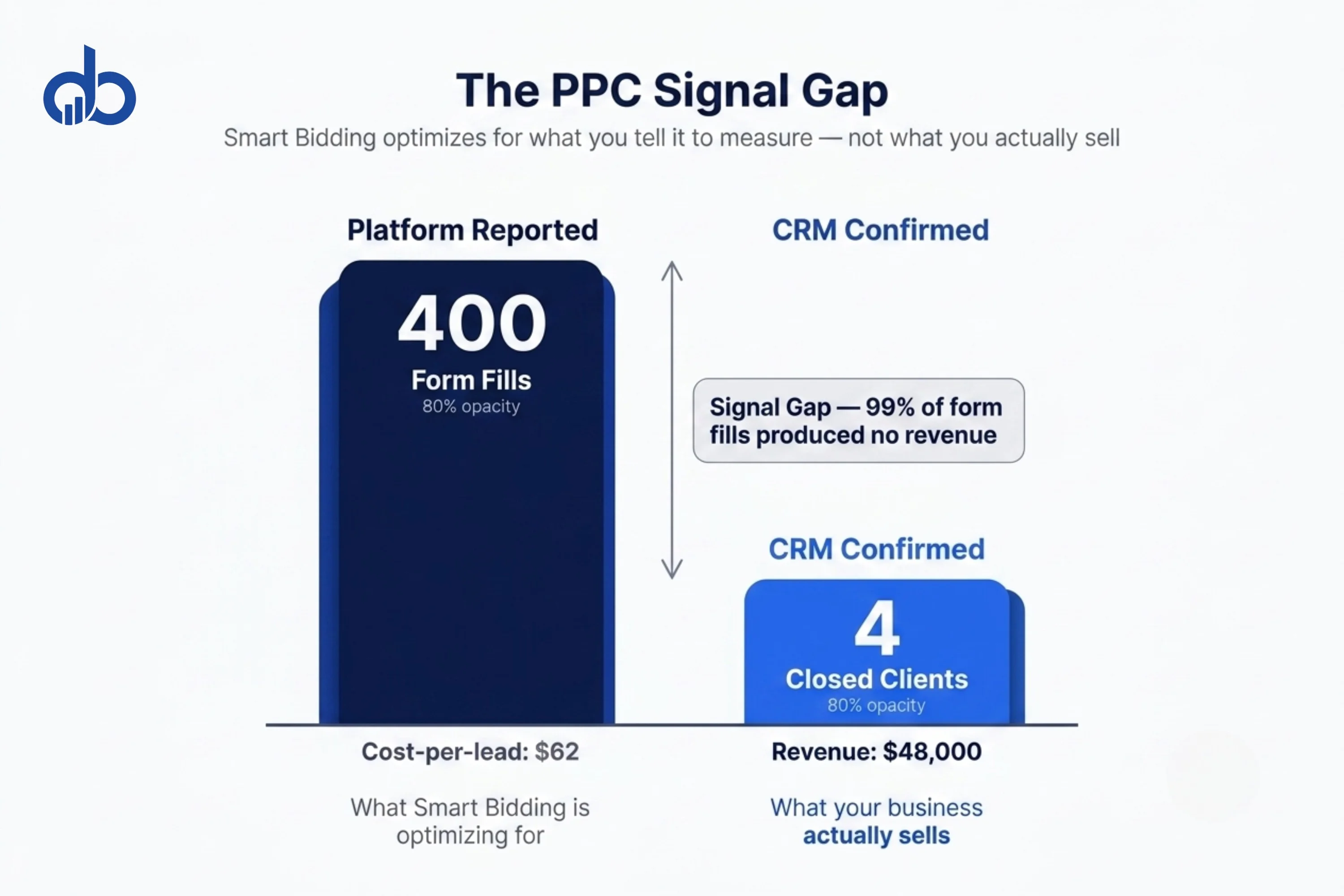
The conversion events most PPC campaigns track are form fills, call clicks, demo bookings, and email signups. These are real actions. A user who clicks an ad and fills out a form is measurably closer to a sale than someone who bounces. But closer isn’t the same as there.
In a B2B or professional services context, a form fill is a lead request. Between that form fill and closed revenue sits a qualification call, an SDR (Sales Development Representative) follow-up, a proposal, a decision cycle, and often months of no movement. A PPC campaign can generate 400 form fills in a quarter at a strong cost-per-lead and produce only four clients. The form fill that Smart Bidding treats as a success event might generate zero revenue for the business.
And here’s the compounding problem. When Smart Bidding runs on form fill data at scale, the algorithm finds more audiences that behave like recent converters: specifically, people who fill out forms. That’s exactly who it learns to target. Campaigns with strong platform conversion rates often fill pipelines with low-intent leads. The agency reports a healthy cost-per-lead. The sales team reports wasted time on prospects who were never going to buy.
Sound familiar?
This is the core failure of “optimize for conversions” as a PPC campaign strategy instruction. It’s accurate advice that’s incomplete in practice. PPC conversion optimization is the right direction, unless your conversion event isn’t correlated with revenue.
Are your campaigns finding buyers or just form-fillers? Get Free Marketing Audit
What the Data Actually Shows
Two data problems compound the signal issue for most PPC strategy for sales implementations, and both operate silently inside the platform dashboard.
Attribution overlap inflates reported performance. Any account running paid search alongside Meta Ads, LinkedIn Ads, or retargeting will run into multi-touch attribution duplication. Each platform takes credit for the same conversion because each platform saw the user at some point in the journey. Combined ROAS reports across platforms frequently overstate actual blended return. A practical audit reveals the gap: add up the conversion value each platform claims and compare it to CRM-confirmed closed revenue. The difference is often large enough to change budget allocation decisions. Because of that inflation, campaigns that look like your strongest performers may actually be your most expensive traffic drivers.
Pixel tracking loss creates blind spots. Safari’s Intelligent Tracking Prevention, the browser industry’s shift away from third-party cookies, and ad blockers prevent pixel-based tracking from recording a portion of real conversions. Accounts relying on pixel tracking alone are measuring a partial view of actual results. Campaigns that appear to underperform may be driving value the pixel never captures. This is exactly why building a first-party data strategy matters before your pixel data deteriorates further. The result is a PPC campaign strategy built on data that overstates results on paper and understates them in practice, simultaneously.
Neither problem shows up as an alert inside the platform. Both make it harder to know whether campaigns generating conversions are actually generating revenue. If you’re auditing your attribution stack, GA4 metrics give you a cleaner read on what’s actually driving results than any ad platform dashboard will.
A Better Framework: The Revenue Signal Method
Fixing the signal problem requires three components, applied in order. Skipping to component three without completing the first two is the most common implementation error in PPC conversion optimization. And it’s a costly one.
Component 1: Conversion Event Audit
List every active conversion event in your Google Ads account. For each one, assign a revenue correlation score based on how directly it connects to a closed deal:
| Conversion Event | Revenue Correlation | Use As Smart Bidding Signal? |
|---|---|---|
| Page view, scroll depth, video play | Low | No. Observe only |
| Email signup, content download | Low-to-medium | No. Track but not as primary signal |
| Form fill, call click, chat started | Medium | Only for awareness campaigns with long consideration cycles |
| Qualified call completed, demo attended | High | Yes. Suitable for B2B Smart Bidding signals |
| CRM-confirmed closed deal + revenue value | Direct | Yes. The only revenue-correlated event |
Most accounts running Smart Bidding are training the algorithm on medium-correlation events. The audit identifies where the signal is weakest before anything else changes.
Component 2: Offline Conversion Import
Google Ads assigns a unique identifier (GCLID) to every ad click. When that click results in a form fill, the GCLID is recorded alongside the lead data. When that lead closes as a deal in your CRM weeks or months later, you can upload the GCLID and revenue value back to Google Ads via the offline conversion import function.
Smart Bidding then has a direct signal: this click, from this keyword, at this time, in this location, became a $12,000 closed deal. When this data accumulates over 30 to 60 days, the algorithm finds more audiences with similar closing behavior rather than form-filling behavior. Advertisers who implement offline CRM imports see a median 10% increase in conversions with no increase in spend.
Want to see how your current PPC signal setup compares to revenue-optimized accounts? Get Free Marketing Audit
Component 3: Revenue-Weighted Bidding
Only after CRM data flows into the account for 30 or more days does switching to revenue-weighted bidding make sense. Target ROAS and Maximize Conversion Value both require a strong revenue signal to perform reliably. Before that data’s in place, these strategies optimize for the wrong events. After it is, they optimize for what your business actually sells.
This sequence matters. Running Target ROAS on form fill data gives you an algorithm that’s very good at finding people who fill out forms at the cheapest possible cost. Running Target ROAS on CRM revenue data gives you an algorithm that’s finding the audiences most likely to become paying clients. Different goal. Very different outcome.
What This Means for Your PPC Budget This Quarter
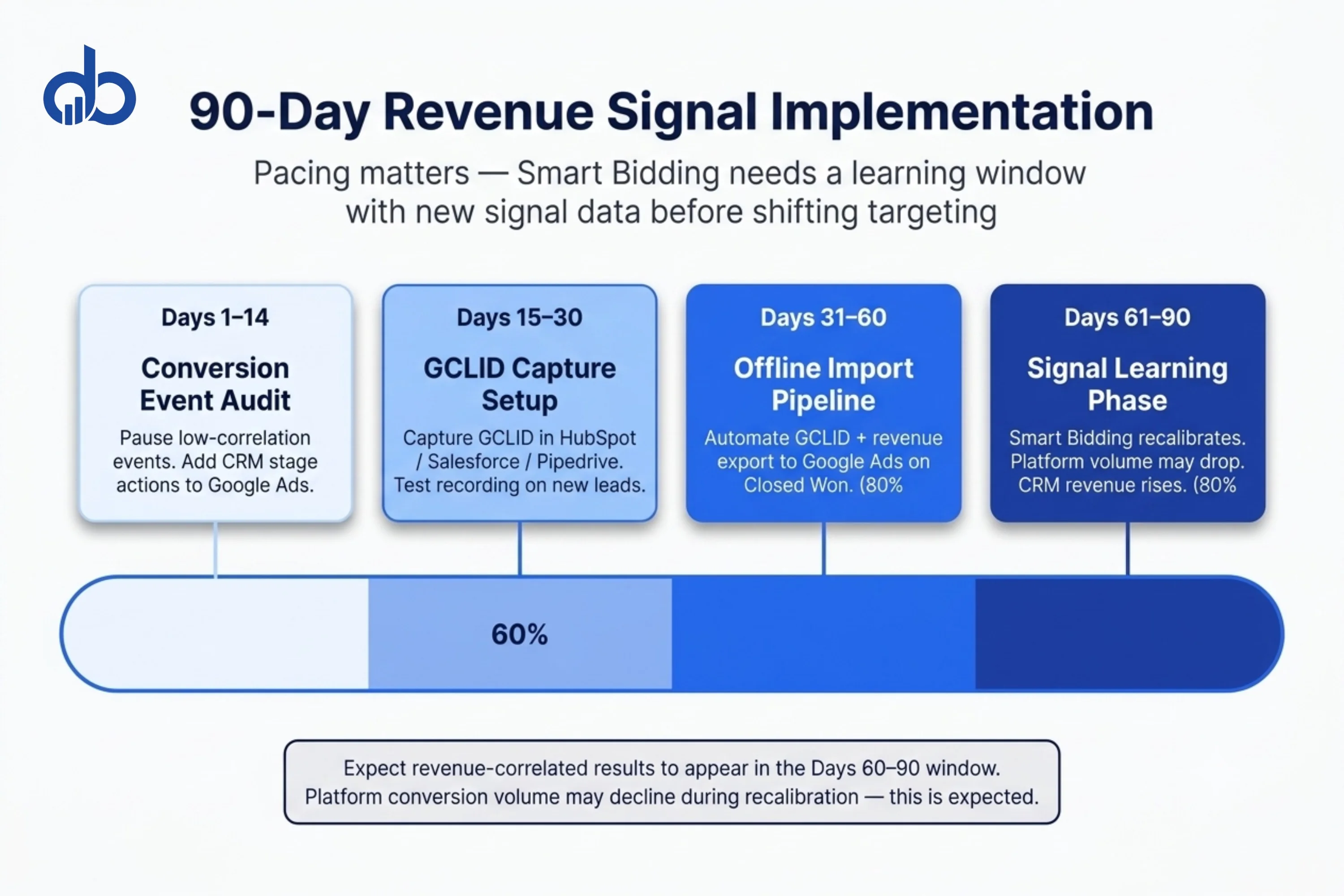
The Revenue Signal Method runs on a 90-day implementation arc. The pacing matters because Smart Bidding needs a learning window with new signal data before it can reliably shift targeting. Rush the bidding transition before CRM data is flowing and you’ll get erratic results during the learning period. That’s not the platform failing; it’s the algorithm working with incomplete information.
Days 1–14: Conversion Event Audit and Cleanup
Pause or demote any conversion events with low revenue correlation. Add qualified call completion or CRM stage events as new conversion actions in Google Ads. Don’t change the bidding strategy yet. The goal at this stage is signal hygiene, not performance improvement. You’re removing the noise before introducing the right signal.
Days 15–30: GCLID Capture Setup
Work with your CRM administrator to capture and store the GCLID parameter from every form fill. HubSpot, Salesforce, and Pipedrive all support this via native fields or a short custom implementation. Test that GCLIDs are recording against new leads before moving to the import step. Skipping the test is how teams discover the data gap six weeks later.
Days 31–60: Offline Import Pipeline
Build the automated import: when a deal moves to Closed Won in your CRM, an automatic export sends the GCLID, deal value, and close date to Google Ads. Manual CSV upload works as a starting point. Automated connections via Zapier or native CRM-Google integrations are more reliable at scale and remove the dependency on manual exports.
Days 61–90: Signal Accumulation and Bidding Adjustment
Let Smart Bidding run on the new signal for 30 days before evaluating performance. During this period, you may see conversion volume drop in the platform. That’s expected. The algorithm is recalibrating away from form-fillers. Revenue in the CRM should move in the opposite direction. One common outcome: campaigns that appeared to underperform on a CPL basis become your strongest performers on revenue-per-campaign. Budget that was being paused may belong at scale.
“What if conversion volume drops too much during the learning period?”
Expect it. That’s the algorithm doing its job: narrowing its targeting toward buyers instead of form-fillers. If volume drops more than 40% for longer than 3 weeks and revenue isn’t compensating, check whether GCLIDs are importing correctly before making any bidding changes. A broken import pipeline is the most common cause of extended learning periods.
“Do we need to pause the campaigns during the transition?”
No. Run Maximize Conversions without a target during Days 31–60 to let Smart Bidding accumulate the new revenue signal. Only add a ROAS or CPA target once you have at least 30 confirmed offline conversions imported. Switching to a constrained target before that point extends the learning period and can produce erratic bids.
Common Mistakes That Keep PPC Campaigns Click-Optimized
Even after the audit, three implementation errors pull PPC campaign strategy back toward the wrong signal.
Adding micro-conversions as Smart Bidding signals. Scroll depth, video play rate, and time-on-site are useful diagnostic metrics. They’re not revenue signals. Using them as primary conversion actions teaches the algorithm to find engaged browsers, not buyers. These events belong in the observation-only column inside Google Ads, not in the conversion tracking settings that drive Smart Bidding decisions.
Switching to Target CPA before conversion volume is sufficient. Google recommends a minimum of 30 to 50 conversions per month before Target CPA performs reliably. Switching below that threshold produces erratic bidding behavior during the learning period. If volume is low, run Maximize Conversions without a CPA target first. Let it accumulate signal data, then add a CPA or ROAS constraint once volume is established.
Treating branded search as channel performance. Branded search campaigns convert at high rates because users already know who you are. Including branded conversion data in the aggregate performance baseline inflates reported CPA and misrepresents what non-branded campaigns are actually achieving for the PPC strategy for sales goals. Segment branded and non-branded performance separately. They measure different things and require different evaluation frameworks.
The same logic applies to GCLID data. Capturing it early is what makes the offline import timeline work.
Each of these mistakes is fixable. The common thread is moving the optimization signal closer to revenue and giving the algorithm enough time to learn from it.
Clicks Were Never the Problem
You now have a clear path from click-optimized campaigns to revenue-optimized ones. Audit your conversion events. Close the attribution gap with offline CRM imports. Give Smart Bidding the signal it actually needs to increase PPC sales. The framework works because it aligns the algorithm’s objective with the business objective: closed revenue, not a proxy that sits two steps away from it.
Knowing the framework and implementing it are two different challenges. The GCLID capture setup, CRM integration, and bidding transition require technical coordination that most in-house teams haven’t built before. Our Performance Marketing team implements this infrastructure as part of campaign setup and ongoing management. If you want to see where your current PPC signal is breaking down, start with a Free Marketing Audit.
- High CTR with flat sales is a signal problem — Smart Bidding is optimizing for the wrong conversion event, not a budget or creative failure
- Form fills and page visits are proxies for intent; only revenue-correlated events from your CRM give Smart Bidding a signal that predicts closed deals
- The attribution gap between ad platform data and CRM-confirmed revenue is where most PPC budget gets misdirected
- Offline conversion imports — using GCLIDs to pass CRM outcomes back to Google Ads — are the core fix for signal quality in longer sales cycles
- Expect 30–60 days for Smart Bidding to recalibrate after switching to revenue-correlated conversion events; volume may temporarily dip during that period
Frequently Asked Questions
Why do my PPC campaigns get lots of clicks but no sales?
Clicks measure reach, not purchase intent. High click volume means the ads are reaching people, but unless those clicks come from audiences at the decision stage and land on a page that addresses their specific buying criteria, they won't convert to sales. The more common cause for established campaigns: the account is optimizing for weak conversion events (form fills, page visits) rather than revenue-correlated signals from your CRM.
What PPC metrics should I track instead of clicks for sales?
The priority order, from least to most revenue-correlated: clicks, form fills, qualified leads, pipeline stage progression, closed revenue. For short sales cycles under 14 days, cost per closed deal is achievable as a direct PPC metric. For longer cycles, cost per sales-qualified lead is more practical. Track all levels, but let only the highest-correlation event drive your Smart Bidding signal. That is the core discipline of a PPC strategy for sales.
How long does it take to see results after setting up offline conversion tracking?
Expect 30 to 60 days before Smart Bidding has enough revenue signal data to shift targeting meaningfully. During the first 30 days, conversion volume in the platform may drop while the algorithm recalibrates. Most accounts see stabilization of lead quality and improvement in pipeline value in the 60 to 90 day window after full implementation.
Should I use Smart Bidding or manual bidding for a sales-focused PPC strategy?
Smart Bidding outperforms manual bidding when it has the right signal data. The prerequisite is conversion tracking tied to revenue-correlated events. Smart Bidding trained on form fills and manual bidding optimized for low CPC produce similar results. Both optimize for the wrong outcome. The advantage of Smart Bidding becomes clear once CRM revenue data flows in via offline conversion imports.